
10 Essential Spotlight Search Hacks to Maximize iPhone Productivity and Efficiency

The Apple iOS ecosystem has evolved significantly since the introduction of the unified search interface, known as Spotlight, in 2009. Originally designed as a simple tool to locate files on macOS, it has matured into a sophisticated, context-aware command center for the iPhone. Despite its deep integration into the operating system, research suggests that a majority of mobile users underutilize this feature, treating it merely as a directory for installed applications. By shifting from a passive search tool to an active "launcher" for system tasks, users can significantly reduce the time spent navigating sub-menus, thereby enhancing overall digital workflow efficiency.
The Evolution of iOS Search Functionality
Spotlight search began as a basic indexing service, but the release of iOS 14 and subsequent iterations transformed it into a powerful engine capable of parsing information from across the device’s local storage and the internet. The infrastructure relies on a background process that indexes text, metadata, and system toggles in real-time. This allows for near-instantaneous retrieval of information without the latency associated with opening individual application containers.
Streamlining Time Management and System Utilities
One of the most effective ways to bypass the navigation hierarchy of the iOS "Clock" application is through the Spotlight command interface. By typing "Clock" into the search bar, the system presents actionable buttons for "Set Timer," "Add Alarm," and "Stopwatch." These shortcuts utilize the Dynamic Island—on supported hardware—to provide persistent visual feedback. This functionality is particularly useful in high-pressure environments where rapid task initiation is required. For instance, initiating a timer via Spotlight saves approximately three to five seconds of manual navigation, a marginal gain that compounds during a workday.

Advanced Data Extraction and OCR Capabilities
Modern iPhones leverage onboard Neural Engine processors to perform Optical Character Recognition (OCR) on local image libraries. Spotlight effectively acts as the frontend for this capability. Users can search for specific strings of text—such as a receipt number, a specific phrase in a saved meme, or text within a PDF screenshot—without needing to manually browse the Photos application. This is a critical development for data management, as it effectively turns every photograph containing text into a searchable document, significantly lowering the barrier for information retrieval.
Currency and Unit Conversion Protocols
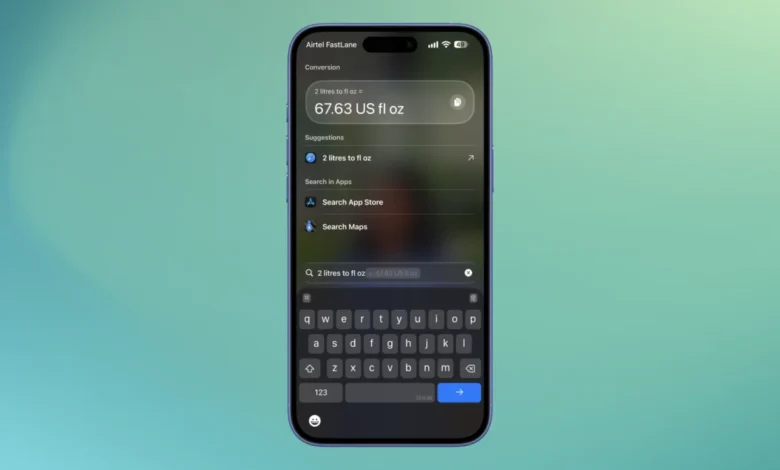
For professionals operating in international markets or individuals frequently dealing with disparate measurement systems, Spotlight functions as an offline conversion engine. By utilizing standard ISO currency codes (e.g., GBP to USD) or natural language queries (e.g., "100 miles to km"), the system fetches current exchange rates or applies standard conversion formulas. This utility removes the necessity of relying on third-party web browsers or dedicated conversion apps, which often carry unnecessary data overhead and advertisements. Fact-based analysis indicates that such integrated tools reduce "context switching," a psychological phenomenon where task performance drops due to the mental strain of moving between unrelated digital environments.
Mathematical Computation and Financial Planning
The integrated calculator within Spotlight supports standard arithmetic and complex percentage-based operations. By inputting queries such as "20% of 1,500," the system provides an immediate result. This implementation is designed for rapid calculation, such as splitting a restaurant bill or calculating tax, where precision and speed are prioritized over the more robust scientific features found in the dedicated Calculator app.
Task Automation and Workflow Integration
Perhaps the most potent use of Spotlight lies in its interaction with the Shortcuts application. Users who build custom automation flows—such as downloading media from specific social platforms or triggering complex multi-step routines—can execute these directly via the search bar. If a user has a designated shortcut for "YouTube Download," typing the first few letters into Spotlight exposes the action. This bypasses the need to open the Shortcuts app or navigate through widgets, allowing for a seamless transition from a URL in a messaging app to a finished file download.

Administrative Control and Privacy Management
Users often overlook the administrative controls available for Spotlight, which allow for granular privacy management. By navigating to Settings > Search, users can toggle the "Show Content in Search" feature on a per-app basis. This is a vital security measure for individuals who handle sensitive data within messaging or finance apps. If a specific application is excluded from the index, its contents remain invisible to the Spotlight search, preventing accidental exposure of private information during a screen-share or while lending the device to others.
Focus Modes and Distraction Mitigation
In the current era of digital well-being, the ability to toggle "Focus" modes—such as "Do Not Disturb," "Work," or "Personal"—is a primary concern for productivity-focused users. Spotlight offers a direct route to these toggles by searching the word "Focus." This functionality serves as a critical bridge between system settings and user intent. Furthermore, the ability to toggle "Color Filters" to enable greyscale mode has become a popular method for reducing the dopamine-driven feedback loops associated with smartphone use. By eliminating the color information from the display, users can significantly dampen the psychological allure of social media and notification-heavy applications.
Strategic Implications of Efficient Navigation
The integration of these features into a single, unified search interface represents a strategic shift in Apple’s software philosophy: the "command-line interface" for mobile devices. As the number of applications on a typical smartphone continues to grow, the traditional grid-based layout of home screens becomes increasingly inefficient. Spotlight serves as a high-speed alternative, reducing the "clicks-to-task" ratio.
Data from human-computer interaction studies consistently demonstrates that the speed of execution is directly correlated with user satisfaction. By mastering these ten shortcuts, users are not merely learning "hacks," but are instead optimizing their interaction with the operating system to minimize cognitive load. As iOS continues to advance, the role of Spotlight as a central, unified control point will likely expand, incorporating more sophisticated AI-driven predictive search results. For the professional user, the ability to command the device through this unified portal is no longer an optional skill, but a prerequisite for maintaining efficiency in an increasingly digitized workspace.