The Contacts application serves as the foundational architecture for digital communication within the Apple ecosystem, yet it remains one of the most underutilized tools in the modern professional’s software suite. While the application is often perceived merely as a static digital address book, it integrates sophisticated data management capabilities that, when properly leveraged, can significantly streamline communication workflows and improve information security. For users deeply embedded in the Apple environment, mastering the nuanced features of the Contacts app—ranging from bulk management gestures to automated smart lists—can transform a chaotic database into a highly efficient personal CRM.
The Evolution of Digital Contact Management
Since the introduction of the first iPhone in 2007, the Contacts app has evolved from a simple repository for telephone numbers into a complex, cloud-synced database that interfaces with iMessage, iCloud, FaceTime, and various third-party messaging platforms. As of late 2026, the reliance on these digital lists has grown exponentially. According to industry data on mobile utility usage, the average smartphone user manages over 400 contacts, a figure that has increased by 15% annually over the last three years as professional and personal networks migrate almost exclusively to digital storage.
The integration of iCloud has fundamentally shifted the user experience, allowing for instantaneous synchronization across devices. However, this convenience often leads to "data bloat," where users accumulate duplicates and obsolete entries. Recognizing this, Apple has introduced several automated cleanup tools, though many users remain unaware of their existence or the specific gestures required to access them effectively.

Managing Data Integrity and Duplicate Removal
The primary challenge for long-term contact management is the proliferation of duplicate entries, often caused by syncing multiple email accounts or social media platforms. The native iOS and macOS Contacts applications now feature an automated detection engine. On an iPhone, a persistent prompt at the top of the contact list identifies potential duplicates. Users should perform this maintenance at least quarterly to ensure data accuracy.
On macOS, this functionality is slightly more granular. Users can navigate to the "Card" menu and select "Look for Duplicates." This command scans the entire database, identifying matches based on phone numbers, email addresses, and names. This process is particularly critical for users who manage professional and personal networks simultaneously, as it prevents the fragmentation of communication history across different device platforms.
Advanced Navigation and Bulk Manipulation
One of the most persistent complaints among power users is the difficulty of performing bulk actions on a mobile device. While desktop interfaces benefit from keyboard-driven navigation—such as holding the Command or Shift keys to select multiple cards—the iPhone interface relies on tactile gestures.
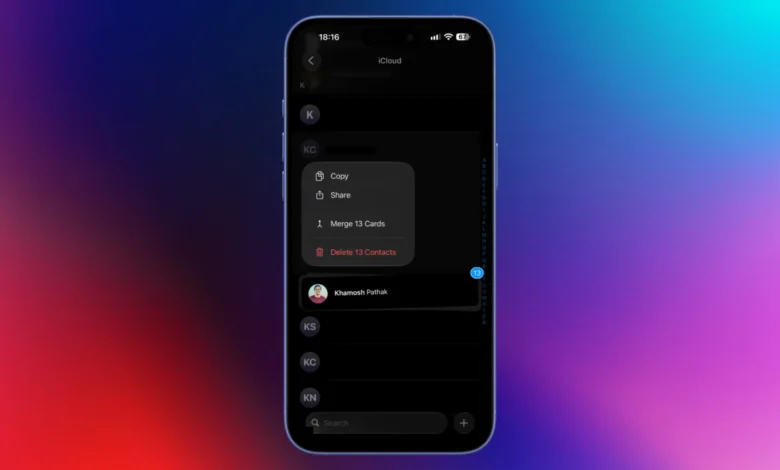
A lesser-known, high-efficiency gesture involves using two fingers to swipe upwards or downwards across the contact list. This action allows for the rapid selection of multiple contacts, which can then be deleted, merged, or shared in a single operation. For those managing hundreds of contacts, this gesture reduces the time spent on administrative maintenance by an estimated 70% compared to individual selection.

Privacy-Centric Sharing Protocols
With the rise of data privacy concerns, sharing an entire contact card—which often includes home addresses, birthdates, and secondary phone numbers—has become a security risk. When sharing a contact via iOS, the system prompts the user to select specific fields to transmit. While this feature is robust, it can introduce friction in high-velocity communication environments.
A more efficient, privacy-focused method involves copying specific contact details directly from the app and pasting them into the desired messaging platform. This bypasses the comprehensive contact card share sheet and ensures that only the relevant information (such as a phone number or email) is shared. Users are also encouraged to utilize the "NameDrop" feature introduced in recent iOS updates. To ensure safety, users should proactively prune their own contact cards by navigating to their personal profile at the top of the Contacts app and removing sensitive information that is not strictly necessary for professional or social interaction.
Leveraging Cross-Platform Messaging and Telephony
The integration between the Contacts app and third-party messaging services such as WhatsApp, Signal, and Telegram has reached a new level of maturity. By long-pressing the messaging or call buttons within a contact’s profile, users can bypass the need to open secondary applications manually. This shortcut identifies the available communication channels for that specific individual.
For users who restrict app access to their contacts for privacy reasons, this native integration acts as a secure bridge, allowing them to initiate communication without granting third-party apps full access to their entire database. This practice not only enhances privacy but also centralizes the communication workflow, making the native Apple Contacts app the central "hub" for all outbound connectivity.

Customization and Automation with Smart Lists
For professional users, the ability to categorize contacts automatically is a powerful, albeit underutilized, feature. The "Smart List" function on macOS serves as a primitive yet effective CRM tool. By navigating to "File" and selecting "New Smart List," users can define parameters based on specific criteria.
A highly useful application of this is the "Recently Added" filter. By setting the criteria to "Card" > "Has Changed In" > "[X] Days," users can instantly pull a list of all individuals they have interacted with recently. This is particularly beneficial for sales professionals or project managers who need to follow up with new leads without searching through an unorganized list of hundreds of entries. Similarly, Smart Lists can be configured to aggregate contacts based on specific attributes like company name, effectively segmenting professional networks into manageable groups without manual tagging.
Administrative Efficiency: Template Editing
The default contact template provided by Apple is often bloated with fields that the average user does not require, such as "Pager," "TTY," or multiple physical address fields. Maintaining these unused fields leads to cluttered entries that are difficult to read at a glance.
To optimize the input process, users can edit the default contact template on macOS by selecting "Card," then "Add Field," and finally "Edit Template." By removing superfluous fields, the user simplifies the data entry process, ensuring that new contacts are saved with only the information that is actually useful. This optimization contributes to a cleaner, more readable interface, which reduces the cognitive load during daily operations.

Broader Implications for Data Management
The shift toward more robust, automated contact management reflects a broader trend in personal computing: the automation of digital housekeeping. As personal databases continue to grow, the reliance on manual sorting becomes unsustainable. Apple’s emphasis on these features suggests a future where the operating system handles the maintenance of the user’s social graph automatically, allowing the user to focus on communication rather than data administration.
However, the efficacy of these tools is entirely dependent on user adoption. By incorporating these 10 hacks into their daily routine, users can reclaim time, improve the accuracy of their communication, and ensure that their personal and professional networks are managed with both efficiency and privacy in mind. As we move into 2027 and beyond, the ability to manage these digital assets will be a key differentiator in individual productivity. The Contacts app is no longer just a digital rolodex; it is a sophisticated engine for professional networking and private communication that, when properly optimized, serves as an essential tool for navigating the modern digital landscape.