
Mastering the Fitbit Edge: A Comprehensive Guide to Maximizing Your Minimalist Fitness Tracker

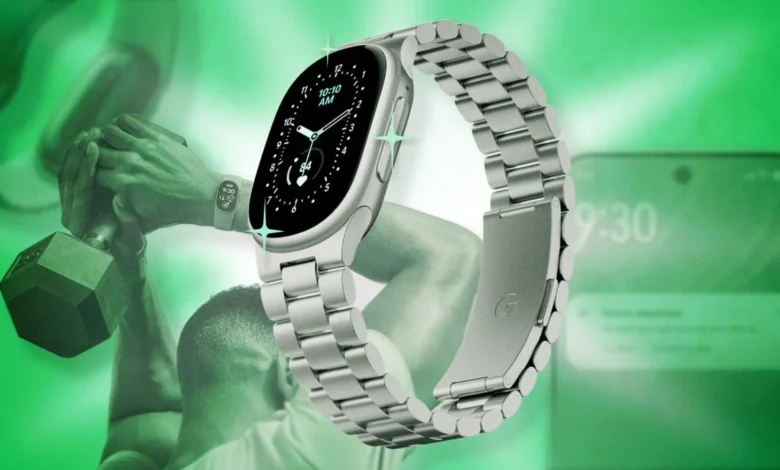
The Fitbit Edge has emerged as a significant player in the wearables market, positioning itself as the definitive minimalist alternative for users who prioritize essential fitness metrics and timekeeping over the complex, power-hungry interfaces of full-featured smartwatches. Released as a strategic successor to the Charge 6, the Edge addresses long-standing consumer feedback regarding device footprint and user interface efficiency. By streamlining the hardware and focusing on a high-density information display, the device provides a distinct value proposition for athletes and health-conscious professionals alike.
The Evolution of the Fitbit Ecosystem
The introduction of the Fitbit Edge follows a period of transition for Google’s wearable division. Following the acquisition of Fitbit, Google sought to unify its health-tracking software under the Google Health app umbrella. Historically, users encountered friction when transitioning between devices, as software ecosystems were often siloed by hardware generation. The Edge represents the first wave of devices designed to function within a multi-device framework, allowing users to swap between the screen-inclusive Edge and the screenless Fitbit Air seamlessly.
This interoperability is a critical shift in product strategy. By allowing users to maintain a singular data stream in the Google Health app while rotating devices based on the day’s activities—such as using the Air for high-contact sports and the Edge for daily monitoring—Google is effectively lowering the barrier to entry for wearable adoption.
Device Optimization and Interface Customization
While the Fitbit Edge is designed for simplicity, it offers a sophisticated array of hidden features that allow for granular control. Central to the user experience is the watch face management system. Users can cultivate a "watch face wardrobe" directly through the Google Health app, which facilitates not only aesthetic changes but functional ones as well.
By accessing the "All Clocks" menu within the device settings, users can select specific complications—such as real-time weather updates or daily step counts—to display on the home screen. This level of customization ensures that the most pertinent data is accessible at a glance, reducing the need to navigate through deeper menus during high-intensity training. The ability to customize color schemes and complication layouts serves to mitigate the visual fatigue often associated with smaller OLED panels.
Ergonomic Adjustments and Input Control
A common point of contention for previous tracker models was the placement of physical inputs. The Fitbit Edge arrives with a default orientation that favors a right-side button placement, which may prove cumbersome for individuals who wear additional wrist accessories or who wear their device low on the wrist.
The software allows for a complete inversion of the display orientation. By navigating to "Device Preferences" in the Google Health app, users can toggle the "Tracker Orientation" setting. This software-driven pivot requires the user to physically rotate the device on the wrist, effectively relocating the button to the left side. This design flexibility acknowledges the diverse biomechanical preferences of users and underscores a move toward user-centric hardware design.
Enhancing Data Precision and Integration
One of the most frequent criticisms of modern fitness trackers is the propensity for "step inflation," where involuntary arm movements—such as typing or commuting—are recorded as active steps. To address this, the Fitbit Edge utilizes a sensitivity adjustment setting. By setting the "Wrist Preference" to "Dominant" within the application, even for users wearing the device on their non-dominant hand, the algorithm adjusts the accelerometer thresholds. This effectively filters out low-amplitude movements that are commonly misidentified as walking, providing a more accurate assessment of daily activity levels.
Furthermore, the device offers advanced integration with third-party platforms like Strava. For users requiring high-fidelity data, the Edge features a heart-rate broadcast mode. By activating the Wi-Fi heart icon in the quick-settings menu, the device functions as a dedicated heart-rate monitor. When paired with the Strava application during a workout, this allows the phone to process GPS data while utilizing the more accurate pulse readings from the Fitbit, enabling features such as precise lap timing and real-time mapping that the native Fitbit workout app may lack.
Strategic Battery Management and Power Profiles
Battery longevity remains the primary hurdle for wearable adoption. The Fitbit Edge introduces a tiered GPS management system that allows users to prioritize either battery conservation or tracking precision. By default, the device employs an automated switching mechanism between the device’s internal GPS and the paired smartphone’s GPS.
However, power users can override this. For those who consistently carry their smartphones, locking the device to use the phone’s GPS significantly extends the Edge’s battery life. Conversely, for users who prefer to exercise without their phone, enabling the built-in GPS ensures data continuity at the cost of faster power consumption. This flexibility is complemented by a rapid-charging architecture. Internal testing confirms that five minutes of charging provides approximately 24 hours of usage, effectively eliminating the need for prolonged downtime.
Leveraging Artificial Intelligence in Health Coaching
The integration of AI-powered "Health Coach" features within the Google Health app has polarized the user base. While some value the real-time insights, others find the unprompted notifications intrusive. In response to this feedback, Google has introduced a "No Coach Insights" mode. This setting effectively silences automated prompts while retaining the "Ask Coach" functionality.
The "Ask Coach" feature has expanded to include manual data entry capabilities. Users can now upload photographic evidence of offline workouts—such as gym logs or manual notes—which the AI parses and incorporates into the user’s overall fitness history. This creates a more comprehensive view of user health, bridging the gap between digital tracking and traditional, non-digital fitness logging.
Accessibility and Long-Term Implications
For users with visual impairments or those who find the compact screen size challenging, the "Magnification" feature serves as an essential accessibility tool. A triple-tap gesture triggers a zoom function, allowing users to inspect specific data points on the watch face with greater clarity. This feature supports both 2x and 3x magnification levels, demonstrating a commitment to inclusive design.
The broader implications of the Fitbit Edge’s design are significant. By focusing on a highly modular, software-forward approach, Google is signaling a departure from the "one-size-fits-all" hardware model. The ability to swap between devices like the Edge and the Air without losing longitudinal data suggests that the future of wearable health lies in the ecosystem, not the individual device.
As the industry moves toward more integrated health monitoring, the Fitbit Edge serves as a benchmark for how manufacturers can balance minimalist form factors with high-level data utility. For the average consumer, the device offers a powerful, customizable tool that adapts to personal workflows. For the technology industry, the Edge represents a successful attempt to harmonize user convenience with complex backend data processing, setting a new standard for what a sub-flagship fitness tracker can achieve. As firmware updates continue to refine these capabilities, the role of the Fitbit Edge as a cornerstone of the Google Health ecosystem is likely to remain secure, providing a stable foundation for the next generation of wearable health technology.